How to structure a Google Search campaign: a step-by-step guide
Campaigns, ad groups, keywords, match types, negative keywords and responsive search ads, explained in order, with a structure you can copy.
Short answer
Build one campaign per goal and budget, split it into ad groups that each hold one search theme, give every ad group a responsive search ad written for that theme, add negative keywords from day one, and track conversions before you spend. Structure follows how people search, not how your company is organised.
A Google Search campaign shows text ads to people at the moment they search for something. That makes it the most intent-rich channel in paid advertising, and also one of the easiest to waste money on, because a messy structure sends the wrong ads to the wrong searches.
This guide walks through a clean structure from the top down, in the order you would build it.
How is a Google Search campaign structured?
| Level | What it controls | Example |
|---|---|---|
| Account | Billing, users, conversion tracking | Your company's Google Ads account |
| Campaign | Budget, bidding, locations, languages, schedule | "Search, Category, English" |
| Ad group | One search theme | "Project management software" |
| Keywords | Which searches can trigger the ads | "project management software", "project management tool" |
| Ads and assets | What people see | One responsive search ad, plus sitelinks and callouts |
Think of the campaign as the wallet and the rules, and the ad group as the conversation. If two sets of keywords need different budgets, locations or languages, they belong in different campaigns. If they only need different ads, they belong in different ad groups.
Step 1: Start from what people type
Before you open Google Ads, list the searches your customers actually make. Google's Keyword Planner, your website's search console data and your sales team's notes are good sources. Then group the searches by intent:
- Brand: people searching for your name. Cheap and high-converting; protect it with its own campaign.
- Category: people searching for what you sell ("crm for small business").
- Problem: people describing the pain ("how to track sales leads").
- Competitor: people searching for an alternative. Useful but usually expensive; keep it separate so it can't eat the whole budget.
Each group usually becomes a campaign or a set of ad groups.
Step 2: Split campaigns only when settings differ
Create a new campaign when one of these must be different:
- Budget: brand and competitor traffic should never share a budget.
- Location or language: an English campaign and an Arabic campaign need different ads anyway.
- Bidding goal: a campaign that bids for leads and one that bids for sales should be separate.
Everything else can live as ad groups inside one campaign. Fewer campaigns with more data learn faster than many campaigns with a little data each.
Step 3: One theme per ad group
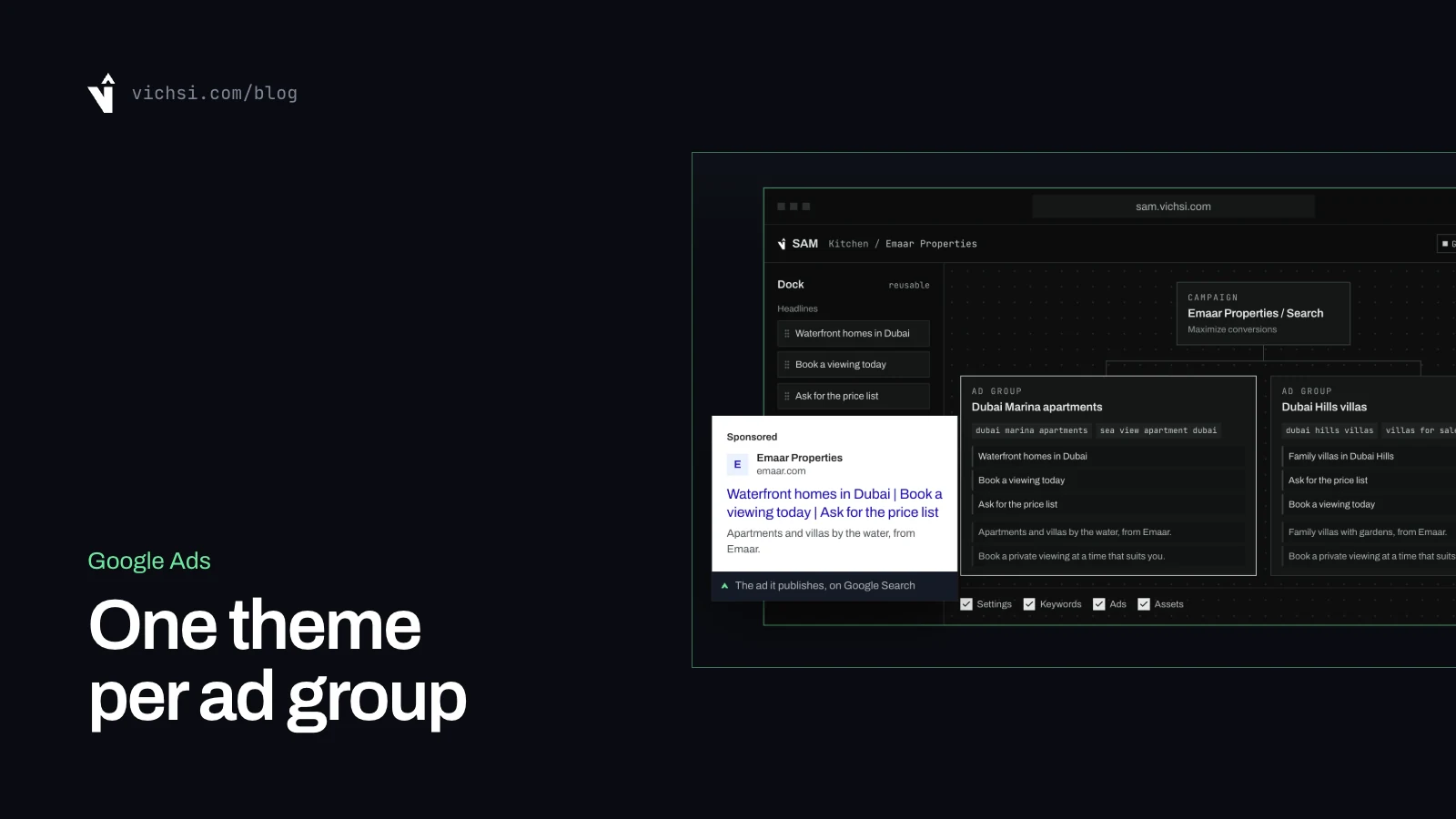
An ad group should hold keywords that share one meaning, so one ad can answer all of them. "Project management software" and "project management tool" belong together. "Free project management template" does not; the person searching for it wants something else.
A practical test: if you would write a different headline for a keyword, it belongs in a different ad group. Most well-built accounts end up with somewhere between five and twenty keywords per ad group.
Which keyword match types should you use?
Match types decide how closely a search must match your keyword.
| Match type | How you write it | What it matches | When to use it |
|---|---|---|---|
| Exact | [project management software] | Searches with the same meaning | Your proven, highest-value searches |
| Phrase | "project management software" | Searches that include the meaning, with words before or after | The core of most ad groups |
| Broad | project management software | Related searches, including ones without your words | With conversion tracking and smart bidding, to find new searches |
Google also offers AI Max for Search, an optional campaign setting that expands matching beyond your keywords and can generate text from your landing page. It can find useful new searches, but it needs good conversion data and close watching. Turn it on once the basic campaign is converting, not on day one.
Why do negative keywords matter?
Negative keywords stop your ads from showing on searches you don't want. They are the cheapest way to improve a Search campaign.
Add a starter list before launch: words like "free", "jobs", "salary", "course", "template" or "download", unless you offer those things. Then open the search terms report every week, find searches that spent money without converting or that clearly don't fit, and add them as negatives. Put account-wide negatives in a shared list so every campaign uses them.
How do you write a responsive search ad?
A responsive search ad (RSA) takes up to 15 headlines of 30 characters and 4 descriptions of 90 characters. Google combines them, showing a few at a time, and learns which combinations work. Because any headline can appear next to any other, each one must make sense on its own.
A simple way to fill the 15 headlines:
- Five that repeat the ad group's theme in different words ("Project Management Software").
- Five that state a benefit ("Plan Every Project in One View").
- Five that give proof or an offer ("Free 14-Day Trial", "Set Up in Minutes").
Use the four descriptions to expand on the benefit, the offer and the next step. Add the two display paths (up to 15 characters each) so the shown address matches the theme, for example example.com/project/software.
Then add assets: sitelinks to your most useful pages, callouts for short selling points, and structured snippets for lists such as features or services. Assets make the ad larger and usually improve click-through rate.
Which bidding strategy should a new campaign use?
- Maximise clicks or manual CPC when you have no conversion data yet and want to learn which searches work.
- Maximise conversions once conversions are tracked and arriving.
- Target CPA or target ROAS once the campaign has steady conversion history and you know what a lead or sale is worth to you.
Whatever you choose, set up conversion tracking before launch: the Google tag on your site, or conversions imported from Google Analytics. Without it, every automated bidding strategy is guessing.
What should you check before you publish?
- Every ad group has at least one responsive search ad.
- Final URLs open, load fast on a phone, and match the ad's promise.
- Negative keywords are added at the campaign or account level.
- Locations use "presence" (people in the area) unless you deliberately target people interested in it.
- The daily budget matches the plan, and the campaign is paused until you have reviewed it.
- Conversion tracking fires on a test lead or purchase.
How can you build Search campaigns faster?
Google Ads spreads one campaign across many screens, which makes it hard to see the structure you are building. SAM lays the whole campaign out on one visual canvas: campaigns, ad groups, keywords and ads side by side, with reusable assets, readiness checks before publishing, and Google Ads Editor import and export. When it is ready, SAM publishes to your Google Ads account, where the campaign waits until you switch it on.
FAQ
How many keywords should an ad group have?
There is no fixed number. Keep keywords that share one meaning together; most ad groups end up with five to twenty. If a keyword needs a different headline, move it to its own ad group.
Should brand keywords have their own campaign?
Yes. Brand searches are cheap and convert well. A separate campaign keeps their budget safe and stops them from flattering the results of your other campaigns.
Are single keyword ad groups (SKAGs) still worth it?
Usually not. Close variants and broader matching mean one keyword now matches many searches, so very narrow ad groups mostly add work. Group by theme instead.
What is a good starting budget for Google Search?
Enough to buy a meaningful number of clicks per day on your main keywords. Check the estimated cost per click in Keyword Planner and plan for at least several dozen clicks a week per campaign, so you have data to act on.
How often should I check the search terms report?
Weekly for a new campaign, then every two to four weeks once it is stable.